Where to Keep Emergency Financial Information Storage: A Practical Guide
When it comes to emergency financial information storage, it can feel like you’re juggling a dozen little tasks at once—maybe you’re sorting through pay stubs in a drawer, or debating whether to stash that stack of documents in the closet for “safekeeping.” Trust me, we’ve all been there, staring at important paperwork and wondering where to put it so we won’t end up in a crisis if a flood, fire, or break-in hits unexpectedly.
But here’s the thing, you don’t have to stress over your vital documents any longer. There are multiple ways to store crucial items like bank statements, loan agreements, wills, birth certificates, or your family’s financial preparedness checklist. The real question is how to pick the right combination of digital and physical solutions for your own comfort and security. Let’s explore eight practical methods you can mix and match, so your emergency financial information is always within reach and safe from life’s curveballs.
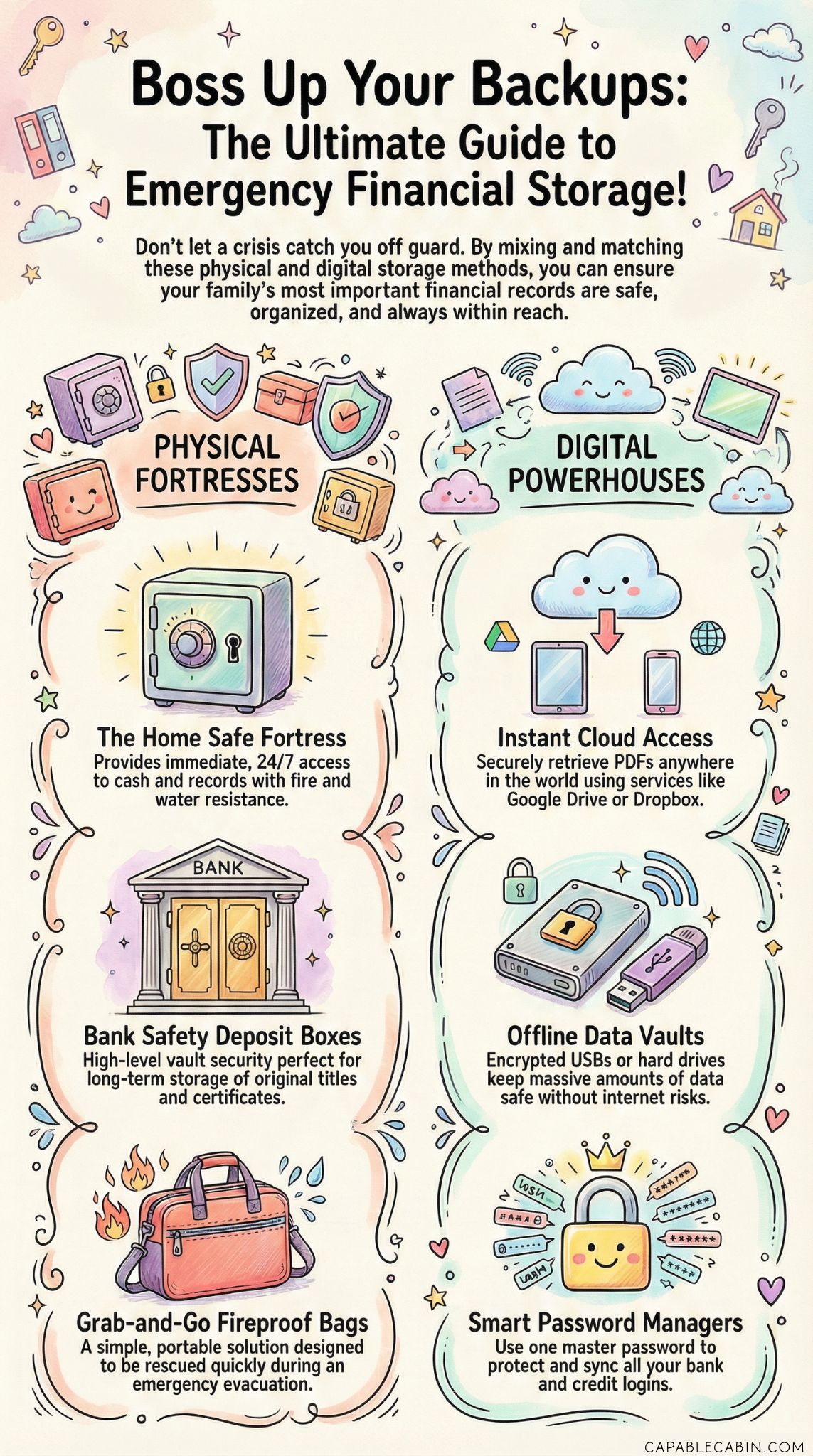
Store In A Home Safe
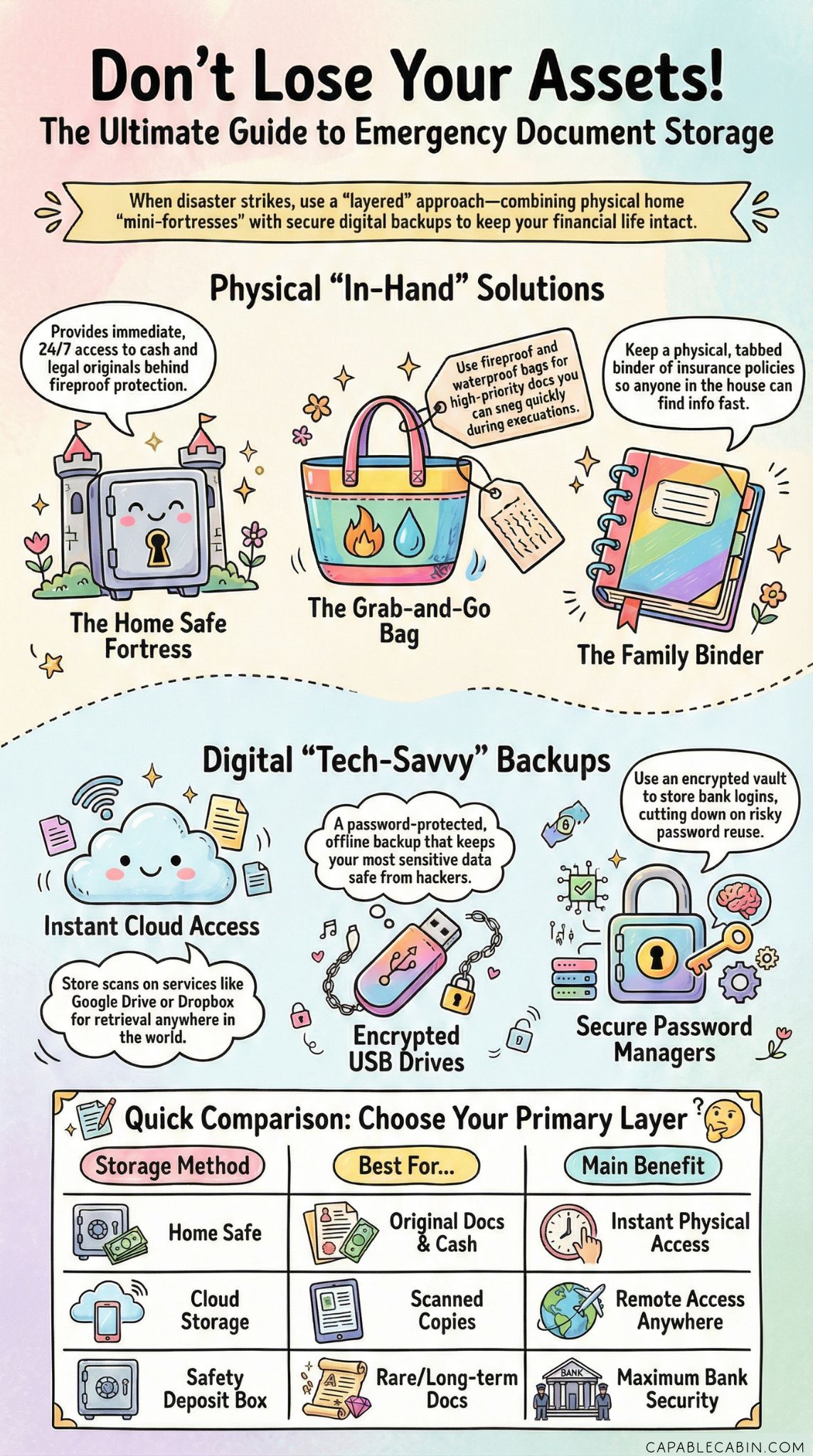
Picture this scenario: you’ve got a brand-new home safe, and you’re placing your most important documents inside with a satisfied grin. A home safe is a classic go-to for keeping financial records, legal paperwork, and even some extra emergency cash at home away from prying eyes. You can find budget-friendly versions or higher-end fireproof and waterproof models. Either way, it’s basically your own mini fortress.
Why It Helps
Immediate access: You don’t have to jump in the car and drive to the bank if you need a specific file at 9 p.m.
Fire and water resistance: Many modern safes come with added protection, offering peace of mind if disaster strikes.
Familiar setup: If you’re someone who prefers tangible security, the idea of turning a physical dial or punching a code feels reassuring.
What To Look Out For
- Size and weight: A small safe can be lifted or moved by a determined thief. Heavier models are more secure, but also more expensive.
Proper installation: A safe might not do you much good if it’s not bolted down or hidden. Take the extra step to ensure it’s secured.
Maintaining a spare key or combination: If you lose your key or forget your code, you’re in for quite a headache.
Consider A Safety Deposit Box
If you like the idea of keeping certain documents outside your home, a safety deposit box at your bank is a tried-and-true method. Tucked away in a secure vault, your valuables and sensitive financial records are protected behind thick walls, cameras, and regulated bank access. It’s a traditional solution, but sometimes that’s exactly what offers stability.
Why It Helps
High-level security: Banks have round-the-clock monitoring systems. Your items typically stay well-guarded.
Disaster resistance: The vault is designed to withstand fires, floods, and other emergencies.
Great for long-term safekeeping: If you’re looking to store original documents (titles, birth certificates) that you rarely need, this is a safe bet.
What To Look Out For
Accessibility constraints: The bank has specific hours, so if you need something on a Sunday afternoon, you’ll have to wait.
Annual fees: Safety deposit boxes aren’t free, so you’ll have that recurring expense.
Content restrictions: Some banks have guidelines on what you can or cannot store, so confirm those details.
Many families choose a mix of both a home safe (for everyday access) and a safety deposit box (for documents they rarely touch). That combined method often puts worries to rest, especially if you’ve also got an emergency fund challenge in progress and want to keep your finances organized in more than one place.
Use Cloud-Based Solutions
For those who want the easiest route to remote access, cloud-based storage is a modern alternative that can keep your important documents right at your fingertips. Think of it as a virtual folder you can open from almost anywhere, as long as you have an internet connection.
Why It Helps
Instant availability: Need to pull up a PDF while traveling? Cloud-based solutions, such as Google Drive, Dropbox, or Microsoft OneDrive, allow you to retrieve files within seconds.
Backups galore: You can duplicate your files in multiple cloud services or across different devices, so even if one system fails, another version can be accessed.
Organization made easy: Tag, label, and search your documents quickly without shuffling through an overstuffed drawer.
What To Look Out For
Security concerns: Hacking is a possibility. You’ll need strong passwords, two-factor authentication, and the discipline to change them regularly.
Subscription costs: Free storage plans are often limited. If you have a lot of scans or high-res images, you may need a paid plan.
Internet dependence: If your internet connection is down, your docs are essentially unreachable until things are back online.
To make cloud storage even safer, consider uploading scanned copies rather than the originals. Keep the physical copies securely stashed at home or in a financial go bag if you need to evacuate. By covering both digital and physical bases, you’ll have a more robust plan for any emergency.
Create An Encrypted USB Drive
Sometimes you need a super-portable way to carry your essential docs, and that’s where an encrypted USB drive shines. Picture your essential PDFs, spreadsheets tracking your emergency fund amount, and maybe even your personal financial notes, all locked behind a password. Then you can slip the USB drive into a secure location, or carry it in your bag if you’re on the go.
Why It Helps
Highly portable: You can tuck it into a small pouch or even attach it to your keychain if you prefer.
Strong encryption: Some USB drives come with hardware-based encryption and password protection, making it nearly impossible for others to view your data without authorization.
Offline storage: Since it doesn’t rely on the internet, hacking risks drop significantly compared to cloud-based servers.
What To Look Out For
Physical vulnerability: If you lose it or misplace it, you lose your data, too. Even though it’s encrypted, keep in mind that it’s still gone.
Limited space: USB drives come in various sizes, but large backups (videos, high-res images) can still eat up space.
Encryption maintenance: You might need special software or updates. If your drive requires a password, forgetting it will be a massive roadblock.
A tip for success: create multiple encrypted drives and store them in different locations. Keep one in your financial emergency binder at home, leave another with a trusted family member, and maybe keep a third in a bank’s safety deposit box. That way, you have fail-safes in more than one place.
Set Up An External Hard Drive
External hard drives function like large, robust USB drives—they can hold thousands of files, from your monthly budget spreadsheets to scanned images of important documents. If you prefer to scan everything in one go and keep it consolidated in a big chunk, an external hard drive might be your ticket.
Why It Helps
Greater capacity: Terrabytes of storage mean you won’t run out of room anytime soon, and you can store backups of entire computer systems.
Backup synergy: Tools like Apple’s Time Machine or Windows Backup let you automate the process. That means your updated documents are regularly saved without needing constant manual uploads.
Encryption options: Many external hard drives also support built-in encryption. Just set it up, and you’re good to go.
What to Look For
Hardware failure: Even the best external drives can fail. That’s why it’s smart to have a second backup on the cloud or on another device.
Physical risk: Since it’s a physical item, it can be stolen, lost, or damaged in a flood or fire. Keeping it in a secure spot is a must.
Software compatibility: Make sure your operating system and the encryption tools on the drive get along nicely. Otherwise, you risk file corruption or read/write issues.
For some families, an external hard drive is a cornerstone of their financial emergency preparedness kit. They’ll update it monthly with new records, which helps them stay on top of both routine finances and unforeseen crises.
Keep A Fireproof Document Bag
Ever worry about losing your most precious documents in a house fire or flood? A fireproof and waterproof document bag can bring serious peace of mind. Typically constructed with fire-resistant materials, these bags are designed to withstand high temperatures and repel water, buying you crucial time to rescue your belongings.
Why It Helps
Simple to use: No complicated setup, no tech knowledge required—just place your papers inside and seal it up.
Easy portability: Many bags come with handles or straps. You can grab it in a hurry if you need to evacuate.
Additional layers of protection: Pairing a fireproof bag with a home safe provides two barriers of defense.
What To Look Out For
Temperature limits: Check the manufacturer’s specs, because different bags hold up to varying degrees of heat.
Ongoing wear: After repeated use, the protective materials can degrade, so make sure to inspect the bag from time to time.
Not totally invincible: It’s a good safeguard, but in a severe disaster, even the best bag can fail. A backup strategy is still essential.
Here’s a helpful hint: combine a fireproof document bag with your financial preparedness checklist so you know precisely what’s inside. This method saves you from rummaging around in a panic, and you’re more likely to remember if something important is missing.
Maintain A Physical Binder
If you’re more of a “paper person” who loves flipping through pages, a physical binder might be the perfect option to organize your emergency financial documents. Think of it as a curated library of everything your family might need in a pinch: insurance policies, copies of your driver’s license, account details, and those oh-so-important estate planning papers.
Why It Helps
Easy organization: You can use tabs, labels, and color-coded dividers, so you can find critical info in a snap.
Quick add/remove process: Updating a binder is as simple as printing out a fresh copy and slipping it into a sheet protector.
Accessible to everyone in the household: Sometimes, other family members or caretakers need to see the files. A binder is intuitive enough for anyone to flip through.
What To Look Out For
Physical wear: Pages can get crumpled, water-damaged, or lost if you’re not careful about proper storage.
Lock and key recommended: Without a locking storage solution, your binder isn’t particularly secure.
Risk of misplacing: If you have multiple binders floating around, you could lose track of which ones are most up to date.
Don’t forget that your physical binder can pair nicely with a digital approach. You could tuck a small emergency fund guide or a printed copy of your year-long emergency fund challenge steps into it, while also keeping digital backups in the cloud. By covering both angles, you’ll be able to breathe easier if an unexpected event comes knocking.
Explore Password Managers
When you think of “financial info,” maybe your mind goes straight to logins and passwords for your bank accounts or credit card portals. Storing these in a notebook can be risky, and your phone’s built-in notes app might not be as secure as you’d like. Enter password managers: they create an encrypted vault for all your login details, so you can access them with one master password.
Why It Helps
Cut down on password reuse: The service often suggests strong, unique passwords for every account, which is a huge plus for digital security.
Automatic syncing: If you choose a reputable manager, your updated passwords sync across devices, so you’re not locked out in an emergency.
Extra layers of encryption: Password managers are specifically designed to protect your login data, making it much harder for potential hackers.
What To Look Out For
Master password risk: If you ever forget your main password, recovering your vault can be challenging.
Subscription fees: Some managers are free, but others charge monthly or yearly. Decide what features you really need before paying.
Single point of failure: In theory, if your manager gets hacked or compromised, everything could be at risk. That’s why you should choose a reputable provider and always enable two-factor authentication.
When used carefully, a password manager is a big part of your overall emergency preparedness strategy. If you can quickly log in to your bank account or your family’s credit cards to freeze them or check balances, it might save you precious time and money in a full-blown crisis.
Wrap Up Your Strategy
Maybe you’re feeling a bit of relief by now—seeing all these options on the table offers a sense of control, doesn’t it? Combining the best of both digital and physical solutions can give you well-rounded coverage. Some folks will create a layering strategy: keep a binder at home in a locking cabinet, store scanned copies on a password-protected cloud service, and slip an encrypted USB drive into a small safe.
No single tactic is completely foolproof, and that’s why it’s so helpful to think in terms of multiple layers. Even if you start small—say, picking up a fireproof bag for your home or setting up a new password manager—each step you take strengthens your emergency financial information storage plan. Before you know it, you’ll have your household’s critical paperwork and account details squared away for the just-in-case moments we all hope never happen.
Remember, it’s absolutely okay if not everything is perfectly sorted right now. Emergencies rarely come with a heads-up, so the sooner you build a plan, the better. You can always adjust and refine as you learn more or see gaps in your system. If you haven’t already, consider tackling a financial preparedness checklist or exploring ways to start emergency fund contributions. Every layer of organization and financial readiness brings you a little more peace of mind. And if you ever feel overwhelmed, just remind yourself: we’re all in this together, and each step forward is something worth celebrating. You’ve got this!